Arazzo Studio: making API journeys visible to everyone
Why I built an open source, browser-based studio to see, test and understand Arazzo workflows in one place, for engineers and for the business people who need to follow the flow too.
Part of APIs
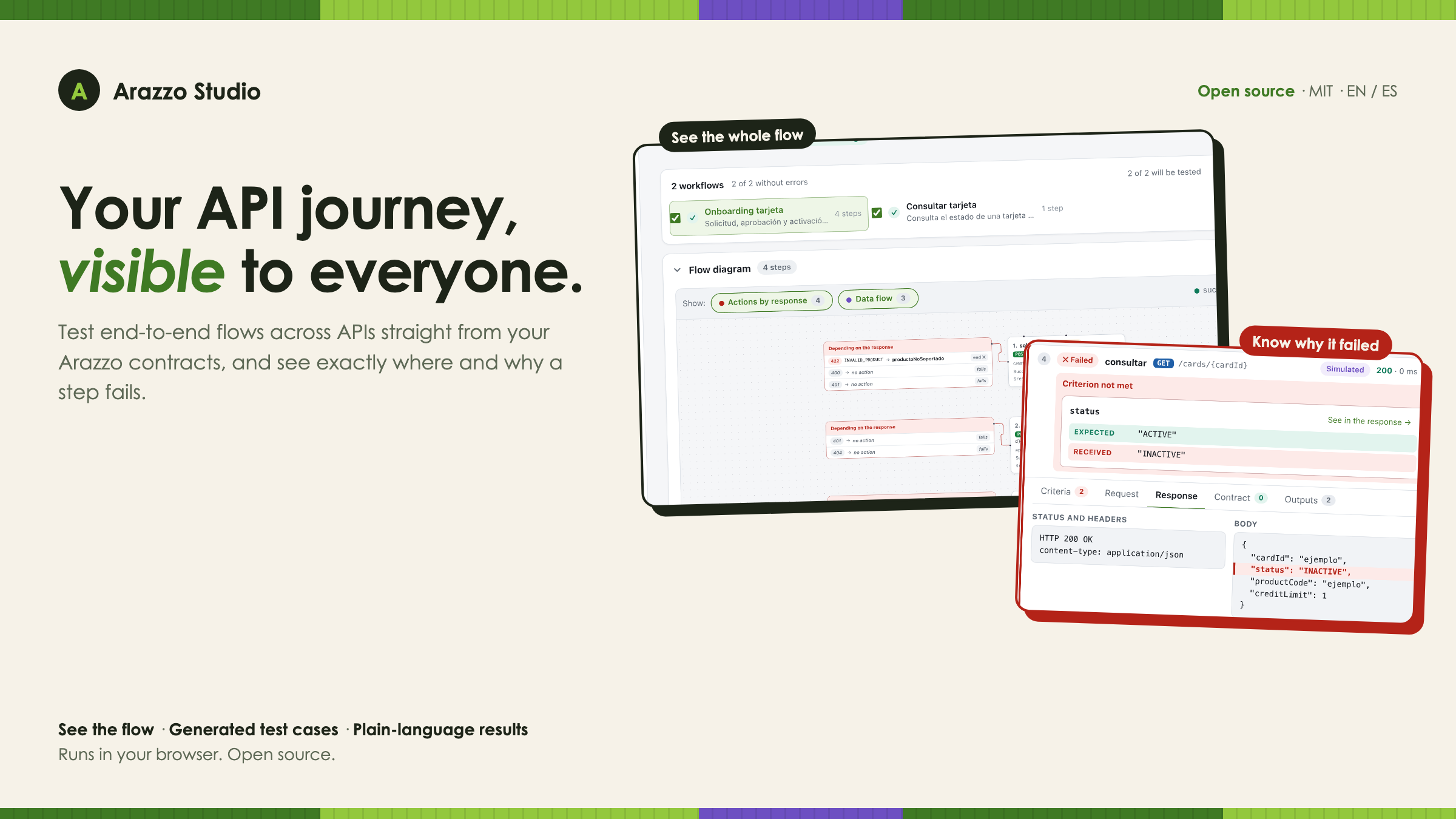
A few months ago I wrote about how I discovered Arazzo after Frank Kilcommins’ session at Apidays New York, and why I believe it deserves a place in every conversation about API governance. That article was about the why. This one is about what happened next, when the theory ran into a real problem on my desk.
I needed to run end-to-end tests across several APIs. Not one endpoint at a time, but a full journey: apply for a credit card, approve the application, activate the card, check its status. Each step depends on the one before. The application ID from the first call feeds the second; the card ID from the second feeds the third and the fourth.
Arazzo was exactly the right way to describe that journey. Describing it was the easy part. Running it, and making the result understandable, was not.
For months I carried an idea around: a place where I could load an Arazzo file, see the journey, run it and understand what went wrong without reading YAML or logs. Not only for me, but for the business people who own those journeys and want to follow them. This is that idea, finally built: Arazzo Studio.
The gap I kept running into
The Arazzo ecosystem is young, but it is moving fast, and there are genuinely good tools. In the previous article I mentioned three that shaped how I think about the lifecycle of a workflow: Arazzo UI to render it, Spectral to govern it, and arazzo-cli to run and debug it. Since then, more editors, visualizers and runners have appeared.
Each of them does its job well. My problem was a specific combination:
| What I needed | Why |
|---|---|
| See the journey | To discuss it with people who don’t read YAML |
| Run it against a real API | Because a valid document is not the same as a working flow |
| Generate the test cases | I didn’t want to hand-write every negative scenario |
| Understand a failure at a glance | A raw JSON dump doesn’t tell a product owner anything |
Most of the runners I found live in the terminal, which is perfect for a pipeline and the right place for automation. Most of the visual tools render the workflow but don’t execute it. I needed both in one place, in a form that both an engineer and a business stakeholder could look at together.
So I built the piece I was missing, on top of the same open standard.
A tour of Arazzo Studio
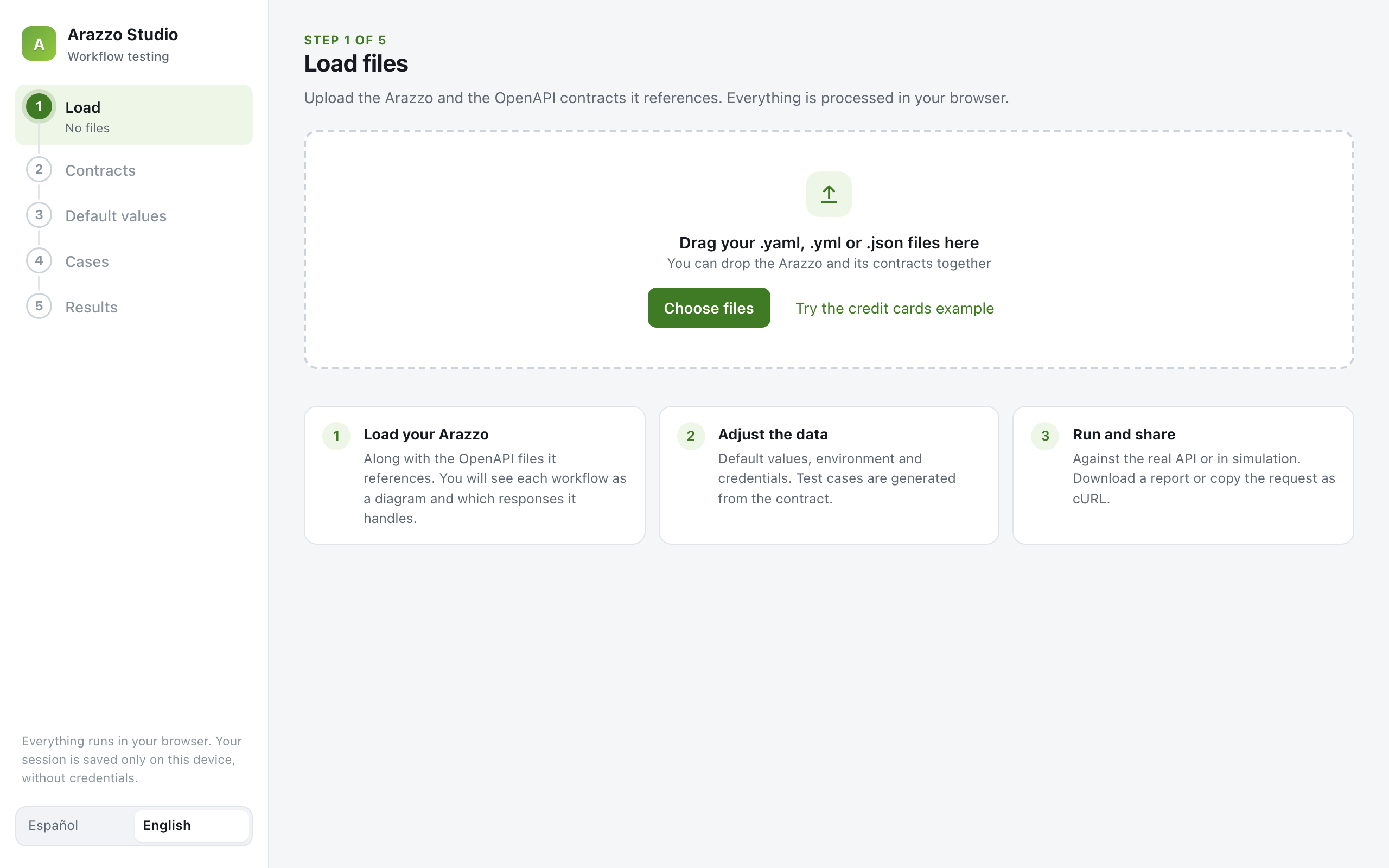
Arazzo Studio walks you through five steps. Everything runs in the browser.
1. Load the Arazzo and its contracts
You drop the Arazzo file and the OpenAPI documents it references. If a contract is missing, the studio tells you which one, and you can attach it by hand or fetch it from its URL.
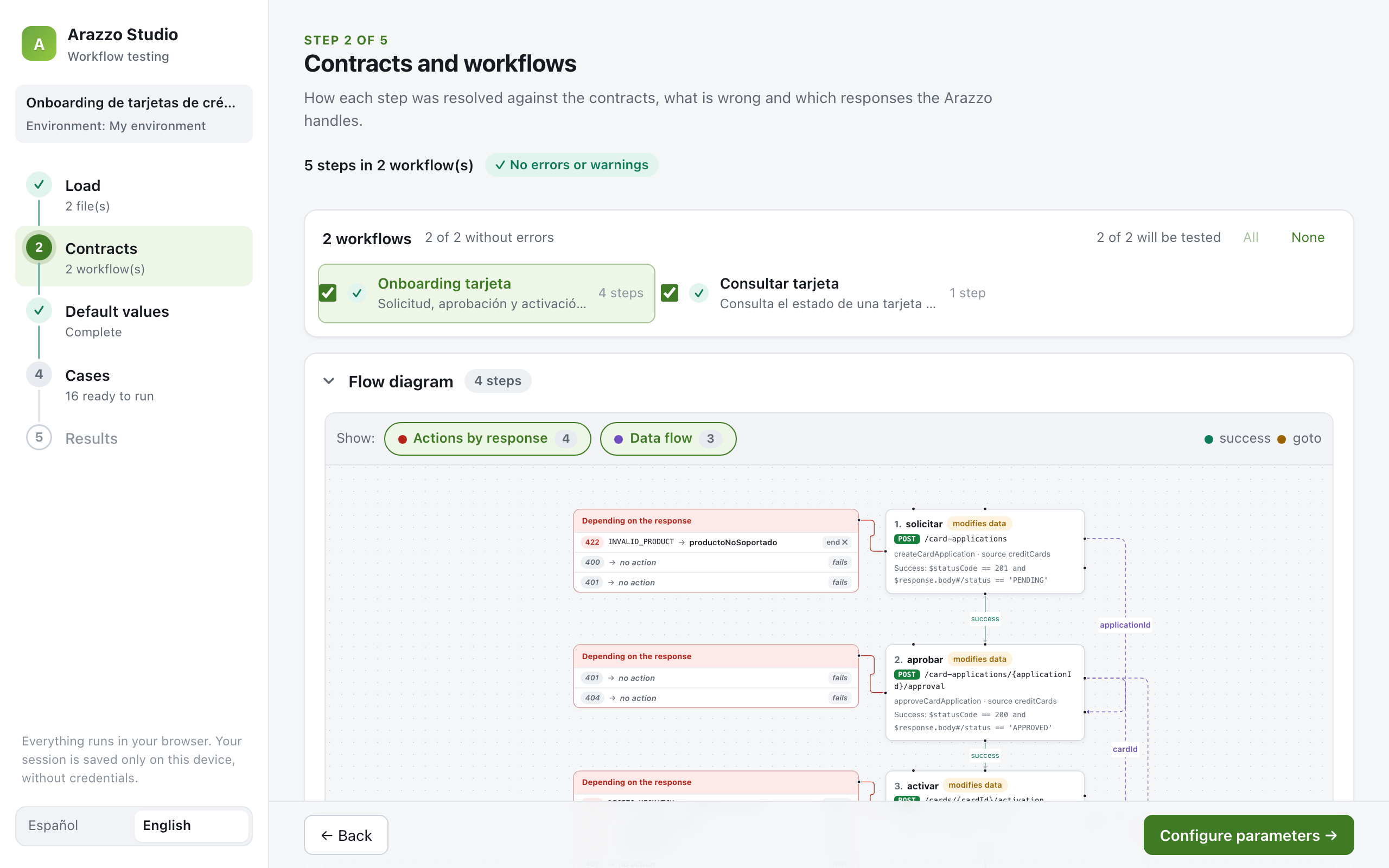
2. See the flow
Each step is resolved to its OpenAPI operation, and every workflow becomes a diagram. You can see the actions each response triggers (end, goto, retry) and, as dashed arrows, the data that travels between steps. A coverage table shows which documented responses the Arazzo actually handles, and validation flags missing operations, required parameters that are never sent and broken references.
This is also where you choose which workflows you want to test. The next steps only show the ones you picked.
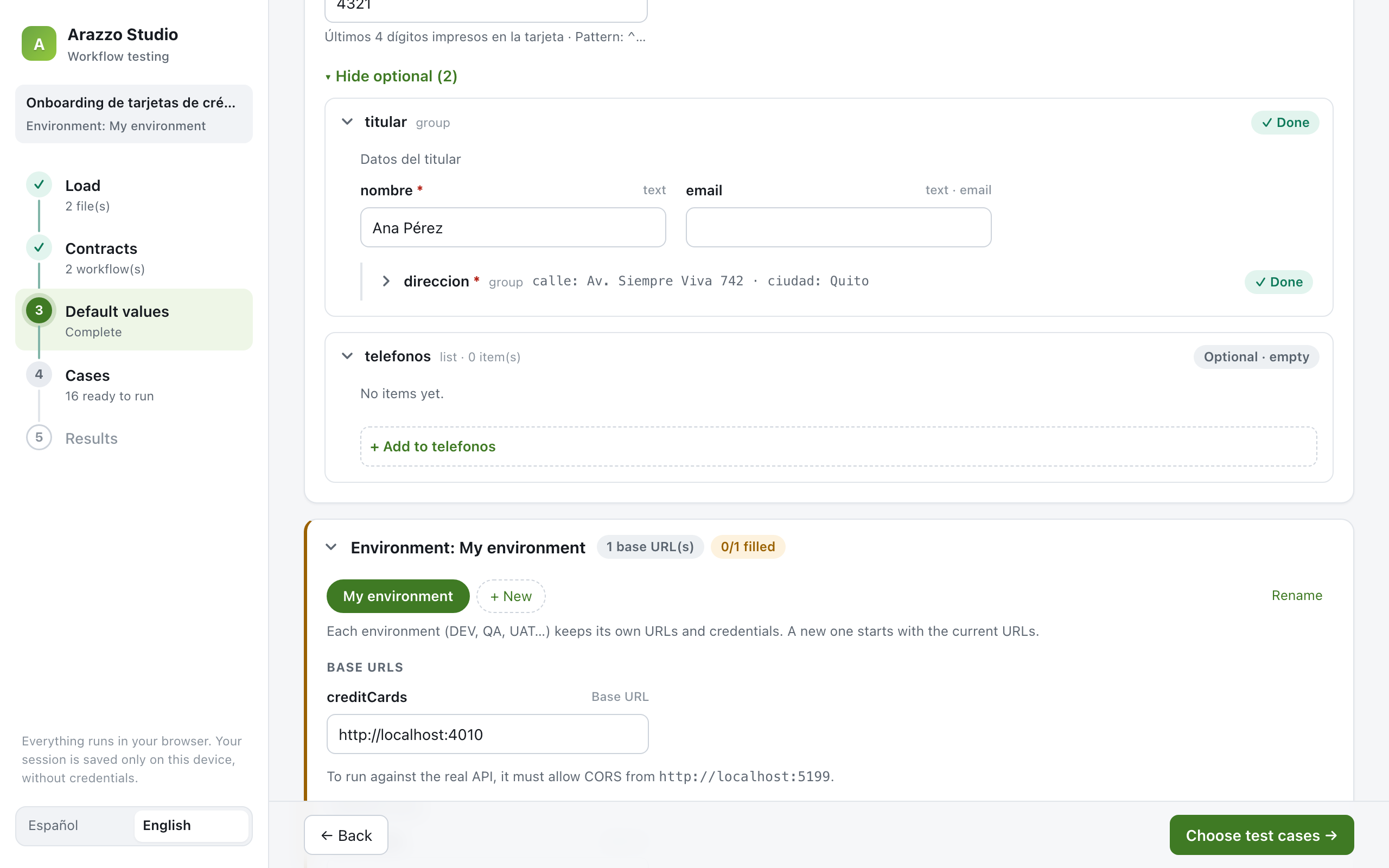
3. Fill in the data
The form is generated from the workflow’s inputs schema. Nested objects and lists are edited field by field instead of as raw JSON, and values are checked against the contract while you type: patterns, lengths, ranges, formats.
Here you also set up environments (DEV, QA, UAT…), each with its own base URLs and credentials. Switching environments asks for confirmation again before running steps that modify data. That detail exists because, in financial systems, running a “create” step against the wrong environment is not a theoretical risk.
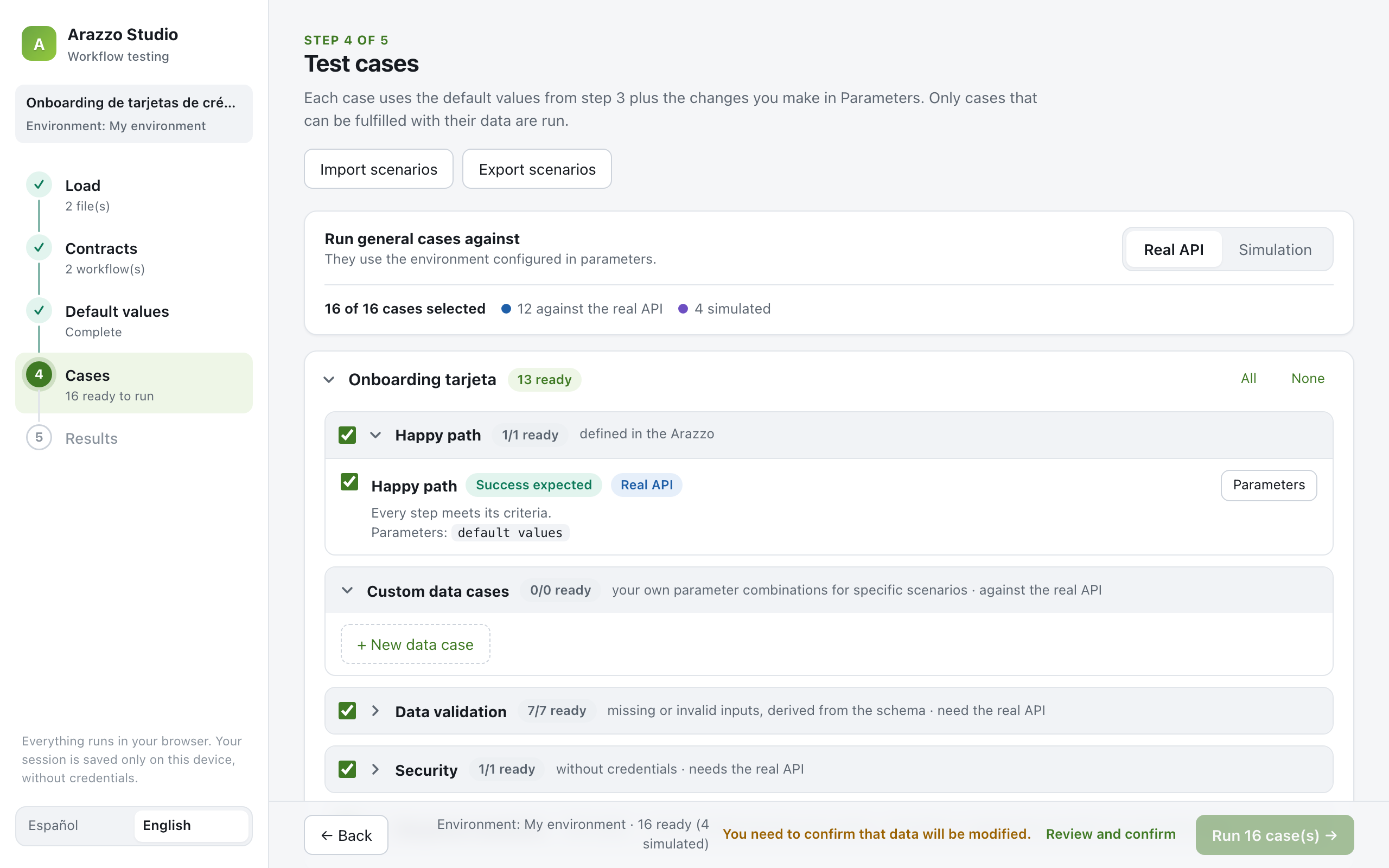
4. Choose the test cases
This is where the contracts pay off. From the Arazzo and its OpenAPI files, the studio generates:
- The happy path, defined by the Arazzo itself.
- Data validation cases: missing required inputs, invalid types and enum values, derived from the schema.
- Security cases: the same calls without credentials.
- One scenario per
onSuccess/onFailureaction: they are simulated from the contract’s examples to check that, given that response, the right action fires. Any of them can be switched to the real API by giving it the data that triggers that response.
You can also add your own data cases and import or export all scenarios as YAML, so they can be versioned next to the Arazzo file.
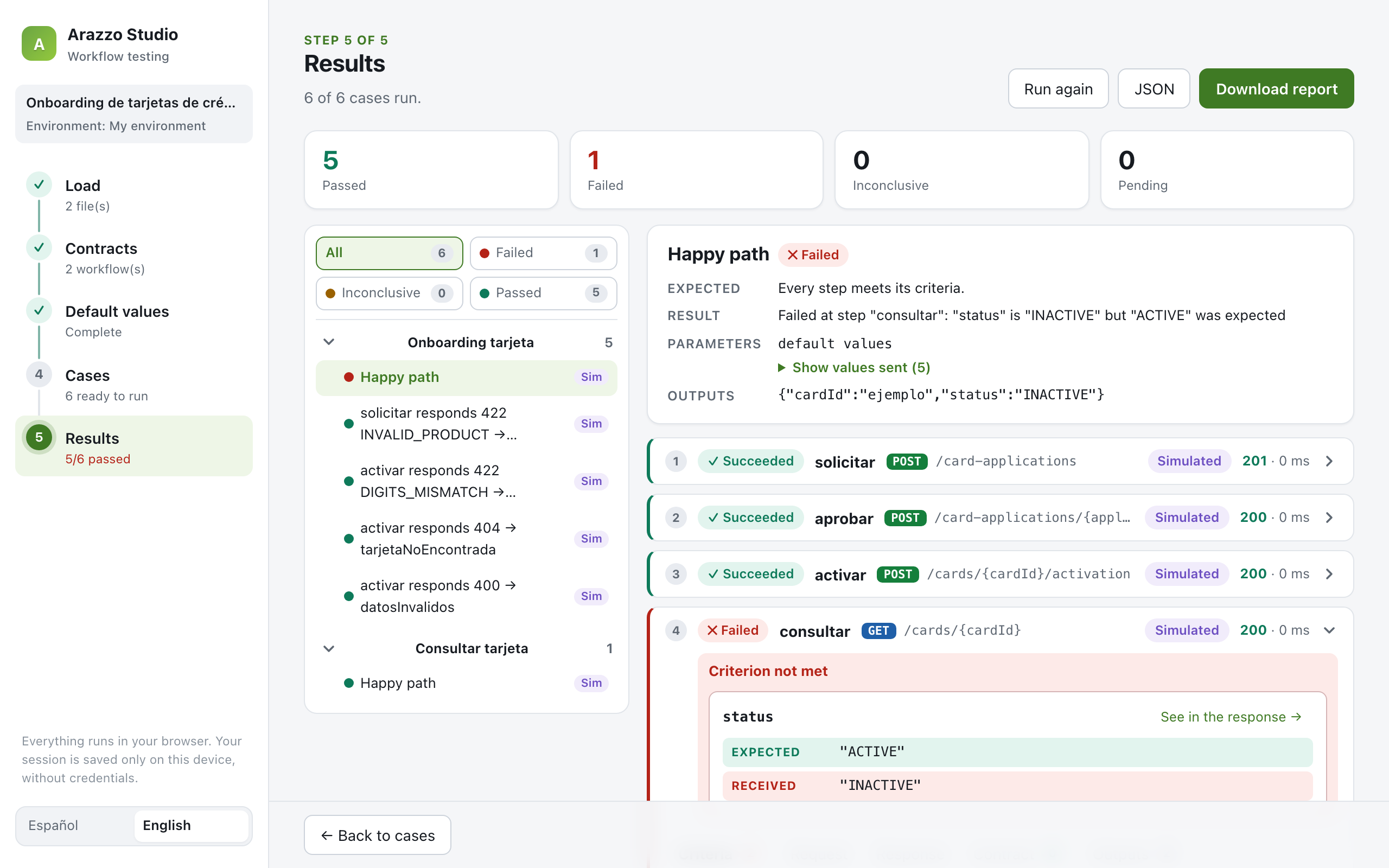
5. Understand the results
While it runs, you see which case is executing and how many are left. Then, for every step: the request, the response, the criteria, the contract check and the outputs. A self-contained HTML report can be downloaded and shared with anyone on the team.
The detail I care about most
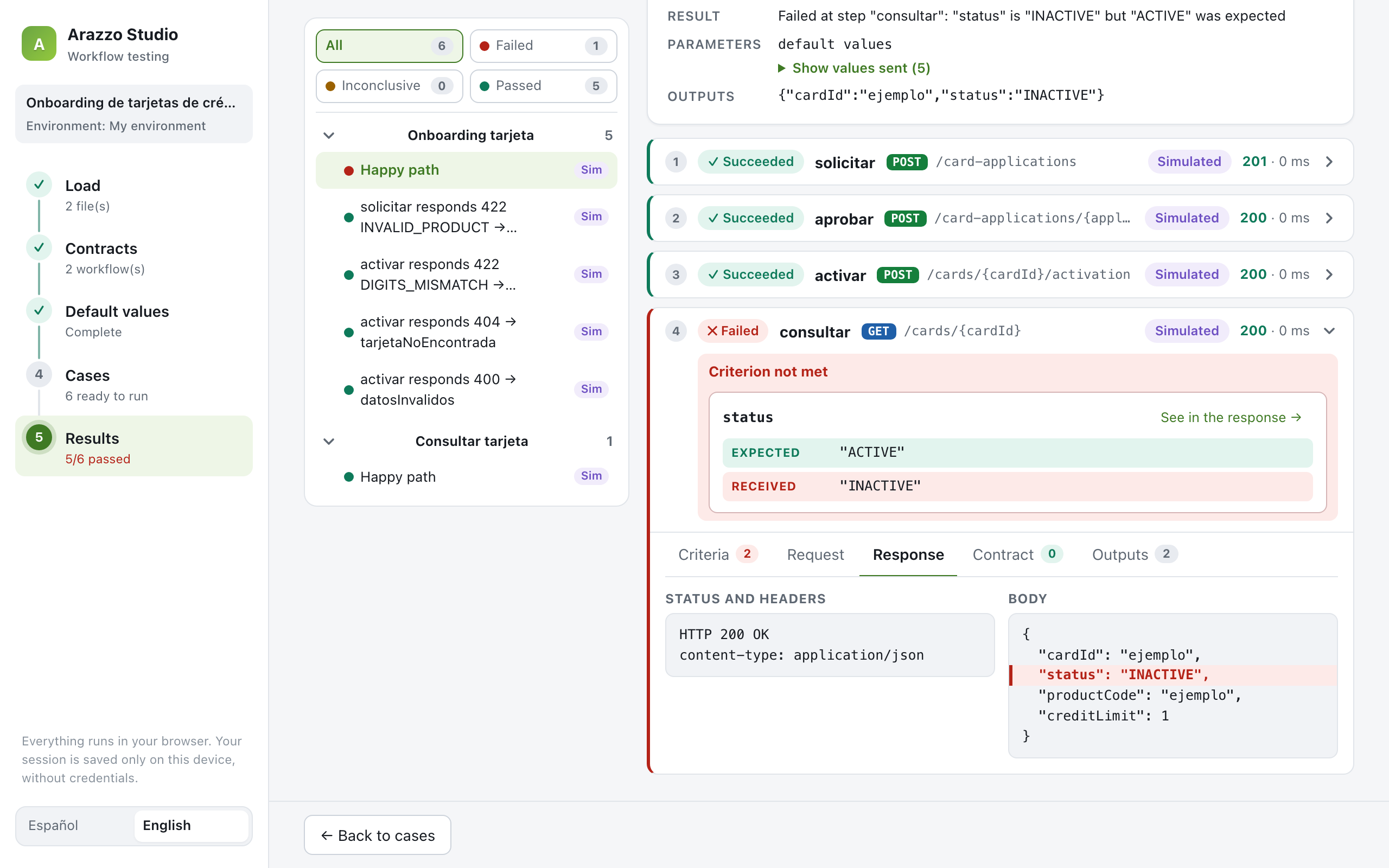
If I had to keep only one feature, it would be this one: when a step fails, you should not have to dig through a JSON dump to understand why.
Consider a success criterion like this one, a regular expression over the response body:
successCriteria:
  - context: $response.body
    condition: '^\{.*"status":"ACTIVE"'
    type: regex
When it fails, the typical message says that the body did not match the pattern and prints the whole body. That is technically correct, and very hard to act on for anyone who isn’t the author of the regex.
Arazzo Studio reads the pattern, finds the "field":"value" pairs it expects, compares them with the actual response and says what is wrong, in plain words: “status” is “INACTIVE” but “ACTIVE” was expected. Then it takes you to the response with that exact line highlighted.
The same idea drives the rest of the experience. If the API can’t be reached, the studio doesn’t just say “network error”. It explains what to check (the URL, http versus https, CORS) and gives you the exact CORS headers your API needs to return for the requests that failed. Any step can be copied as a cURL command, with secrets replaced by <secret> so it can be pasted into a ticket safely.
Built for trust
A tool that runs requests against your APIs, with your credentials, has to earn some trust. A few decisions were non-negotiable:
- Everything runs client-side. There is no backend. Contracts, credentials and responses never leave your machine.
- Credentials are never saved. The session is restored when you come back (files, values, cases, environments), but credentials and any input whose name looks sensitive (
token,password,secret) are left out on purpose. - Secrets are masked everywhere they are shown: results, reports, exports and cURL commands. While building it, we found that an API key sent as a query parameter was visible in the displayed URL. It is now masked too, and the real value never travels with the result.
How it is built
Arazzo Studio is a React and TypeScript application built with Vite, with React Flow for the diagrams. The part I’m most deliberate about is not the UI, though: it is the engine.
Everything that understands Arazzo (loading, resolving operations, evaluating runtime expressions and criteria, running workflows, simulating responses, generating cases) lives in a core module with no dependency on React or the browser. HTTP calls go through a small executor interface with two implementations: fetch for the real API and a simulator that answers with the contract’s examples.
That separation is what makes the next step possible. The same engine can run in a terminal, which means a CLI for pipelines is a matter of a new front end, not a rewrite.
The project ships with 62 tests, continuous integration, and an interface in English and Spanish. It is open source under the MIT license.
Building it with AI agents
I want to be transparent about this: AI agents were essential to building Arazzo Studio.
The split of the work was clear. I brought the need, the product decisions and the taste: what to build, what to leave out, how each screen should feel, and when something “worked” but still wasn’t right. The agent turned those decisions into code, wrote the tests, checked the result in a real browser and kept the history in small, reviewable commits.
A good part of the work was conversational and visual. “These workflow names are hard to read.” “This sidebar looks badly designed.” “Nested objects shouldn’t be typed as JSON.” Each of those turned into a concrete change, verified with a screenshot before moving on. Along the way, the agent also surfaced problems I hadn’t asked about, like the API key leaking into the displayed URL.
What I take from the experience is that the bottleneck moves. Writing code is no longer the slow part. Knowing what to build, judging whether it’s good and deciding what matters to the user is. Those stayed with me, and I think they should.
Where this fits
In the previous article I closed with a picture: OpenAPI for contracts, Arazzo for flows, gates in the pipeline for both. Arazzo Studio adds the missing human-facing piece to that picture: a place where the flow can be seen, exercised and discussed by everyone who depends on it, not only by the people who wrote it.
It doesn’t replace the runners, linters and visualizers in the ecosystem. Those remain the right tools for automation and governance. It adds another way of working with Arazzo: a visual one, built so engineering and business can look at the same journey.
What comes next:
- A CLI on top of the same engine, so the scenarios built in the studio can run in CI.
- End-to-end tests of the interface itself.
- Most importantly, feedback from real workflows. If you work with Arazzo, load one of yours and tell me where it breaks or what you expected to see and didn’t.
Try it
git clone https://github.com/bvegaM/arazzo-studio.git
cd arazzo-studio
npm install
npm run dev
The repository includes a credit card onboarding example and a mock API (npm run mock), so you can explore the whole flow without connecting to anything.
github.com/bvegaM/arazzo-studio
Contracts describe what an API can do. Arazzo describes how APIs produce value together. Arazzo Studio makes that journey visible to everyone who depends on it.